Your data, plainly.
The short version of our privacy policy: where your data lives, who touches it, how long it stays, and the real buttons that export or delete it. Written for the minute before you decide to register.
Where does it live?
Your database rows, uploaded files and backups sit on servers we own in Sydney, Australia, run by Teach P2P Pty Limited. Cloudflare sits in front of the site for TLS and caches public pages only, never your account.
Payment details never reach us. Stripe holds them; we see a customer id and a plan.
What is stored?
- Your account — email, a password hash or your Google id, the plan you are on.
- What you type — goals, tasks, chat, journal entries, habits, and anything you upload or connect on purpose.
- What your iSpirit produces — plans, task results, reviews, and the memory it builds from what you have shared.
- Your settings — voice, language, notification choices.
A memory is a short note your iSpirit keeps from something you told it. Deleting the chat or entry it came from deletes it too.
Not stored: card numbers, advertising identifiers, third-party analytics. We run none.
Who touches it when the AI works?
Is my writing used to train AI models?
Only the text needed for that turn is sent — never your whole account — and under our agreements with Anthropic, OpenAI, Amazon and Google, none of it trains their models. As of 12 October 2026:
| Step | Provider | Where |
|---|---|---|
| Conversation, planning, the wizard judge | Anthropic (Claude) | United States |
| Helper and judging steps | OpenAI | United States |
| Wizard drafts; conversation backup; search embeddings and ranking | Amazon Web Services (Bedrock: Claude, Cohere) | Sydney primary; search steps in US regions |
| Pictures for your goals, habits and iSpirit; avatar mood clips and the portrait reframe before them (clips by invitation only today) | Google Cloud Vertex AI (Gemini image, Veo) | Google global |
| Read-aloud voice | Google Cloud Text-to-Speech; Amazon Polly fallback | Google global; Polly Sydney |
| Dictation (paid plans) | AssemblyAI | EU; recording and transcript deleted on return |
| Payments (paid plans) | Stripe — card details stay with Stripe; we never see them | Global |
| Website delivery (TLS, public-page caching) | Cloudflare | Global edge network |
When a provider changes, this table and the privacy policy change the same day.
How long is it kept?
| Data | Kept |
|---|---|
| Account information | Until you delete your account |
| Chat messages and journal entries | Until you delete them or your account |
| Files you upload in chat | Up to an hour, so a follow-up can use them, unless you attach one to a journal entry (then kept with that entry) |
| Voice recordings | Deleted within 24 hours of transcription |
| Server logs | 90 days |
| After account deletion | All personal data deleted within 30 days; backups purged within 90 days |
How do I delete everything?
- Open Profile → Data + privacy and press Request deletion. You will be asked to type DELETE.
- An email confirms the schedule the same minute, with the dates below.
- You have 30 days to change your mind: sign in and press Cancel. Nothing is touched until day 30.
- On day 30 a daily job removes every row and file you own, then your account. You get a final email as it runs.
- Backups are rotated out within 90 days.
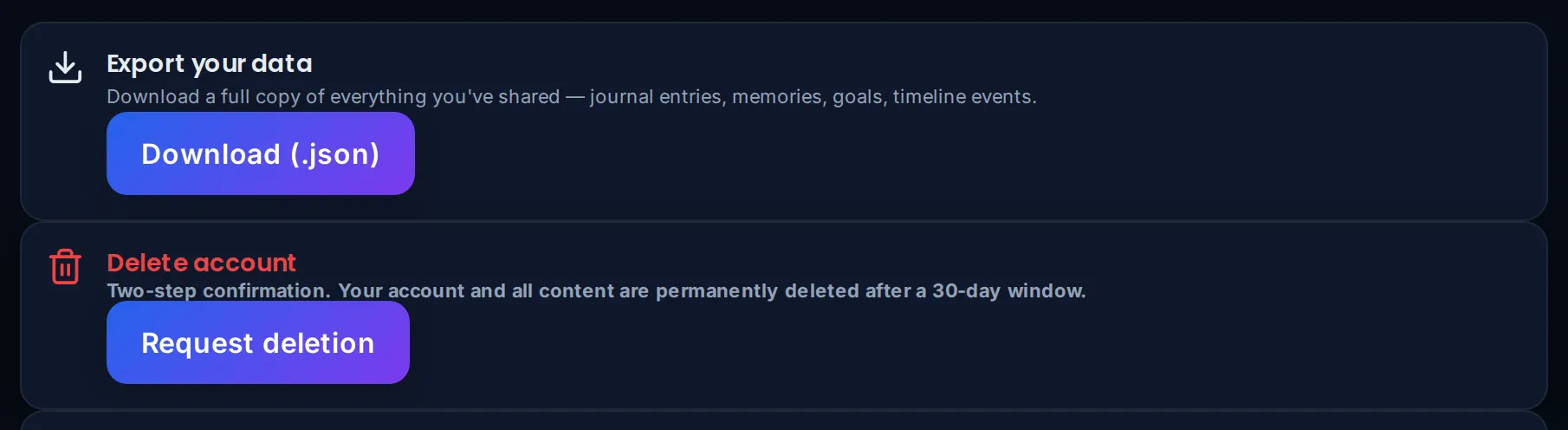
The real tiles, on the profile page of a test account.
Deleting a single journal entry or chat also removes the memory your iSpirit built from it.
How do I take it with me?
Profile → Data + privacy → Download (.json). Free tier included. One file with every table you own, including the memories your iSpirit keeps (as text), readable in any text editor or spreadsheet importer. Connection secrets are redacted; very large tables are capped per table and the file says so.
Want to ask a person?
Data questions: [email protected]. Everything else: [email protected].